𝗘𝘅𝘁𝗲𝗻𝗱𝗶𝗻𝗴 𝘁𝗵𝗲 𝗪𝗮𝗹𝗹𝗽𝗮𝗽𝗲𝗿 𝗮𝗻𝗱 𝗖𝗵𝗮𝗻𝗴𝗶𝗻𝗴 𝘁𝗵𝗲 𝗖𝗹𝗼𝗰𝗸 𝗦𝘁𝘆𝗹𝗲
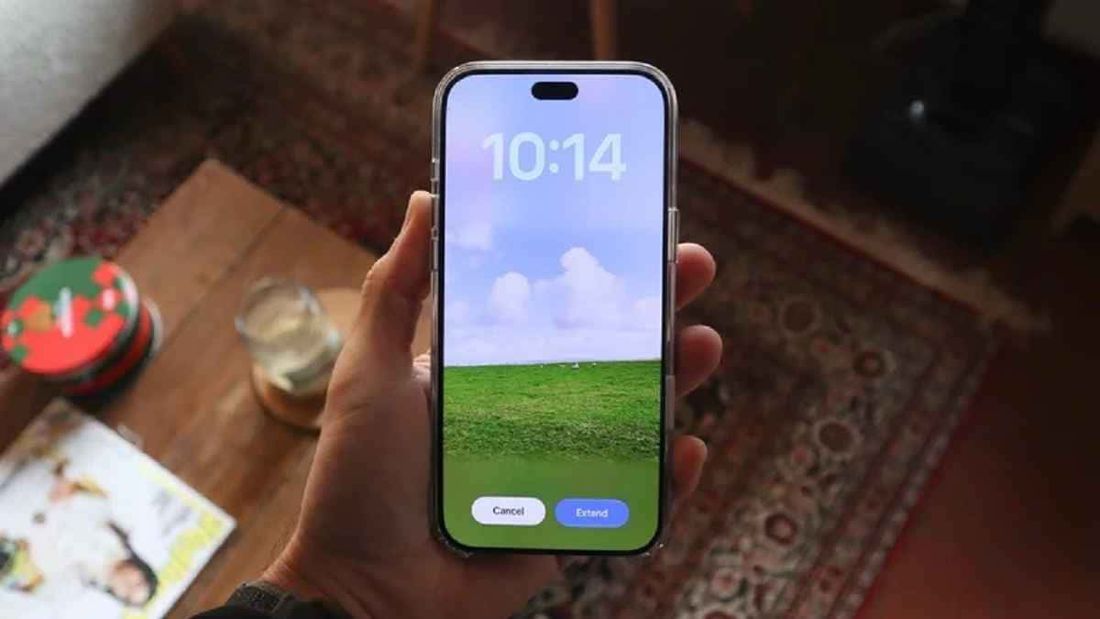
iOS 27 allows users to extend their lock screen wallpaper using the on-device artificial intelligence. This feature is particularly useful when using a landscape photo or when elements in the image, such as a person's face or a pet, are positioned too close to the camera.
To access this feature, users can press and hold the lock screen, select Add or Customize Lock Screen, and then zoom out on the image until the "Extend" option appears. The iPhone uses on-device artificial intelligence to recreate part of the image so that it fits the dimensions of the lock screen.
After customizing the wallpaper, users can change other elements of the lock screen. On iPhones equipped with an Action Button and Camera Control, the traditional flashlight and camera shortcuts can be replaced with other options for quick access.
The available shortcuts include options from Apple and third-party apps, allowing users to create a lock screen that differs from the standard layout.
iOS 27 also introduces a new option to make the clock smaller, after Apple had spent previous years increasing its size. Users can activate the smaller appearance by pressing the clock while editing the lock screen, then selecting the button in the upper-right corner of the font options, which appears as two rectangles. The clock will then move into the date area and appear at a smaller size.
𝗙𝗼𝗰𝘂𝘀 𝗠𝗼𝗱𝗲𝘀 𝗳𝗼𝗿 𝗗𝗶𝗳𝗳𝗲𝗿𝗲𝗻𝘁 𝗪𝗮𝗹𝗹𝗽𝗮𝗽𝗲𝗿𝘀
One feature that many users may not be taking full advantage of is Focus Modes, which Apple introduced with iOS 15 in 2021.
This feature allows users to create different settings for their lock screen, home screen, wallpapers, and filters depending on the time or activity. For example, users can set up a dedicated mode for work, another for driving, or a different screen for swimming, while allowing only selected people to contact them.
In recent years, Apple has introduced broader options for customizing the lock screen on iPhones. Initially, changes were limited to the wallpaper and how it appeared when the screen brightness was reduced. With successive iOS updates, users have gained the ability to customize the clock, fonts, and colors, add widgets and Live Activities, and access other options that give the lock screen a more personalized appearance.
According to a report by BGR, the major expansion of iPhone customization options began with iOS 18, which introduced new options for the lock screen, home screen, and Control Center. This was followed by iOS 26, which brought the Liquid Glass design and a sweeping visual change to the system interface.
In 2026, Apple added even more options, including animated album artwork from Apple Music on the lock screen and support for up to three Live Activities in the Dynamic Island, alongside other improvements.
Below are some of the main ways to make an iPhone lock screen more stylish and personalized.