Strong Signal but Slow Internet: Why Does Wi-Fi Fail in Some Rooms of the House?
Oct 13, 2026
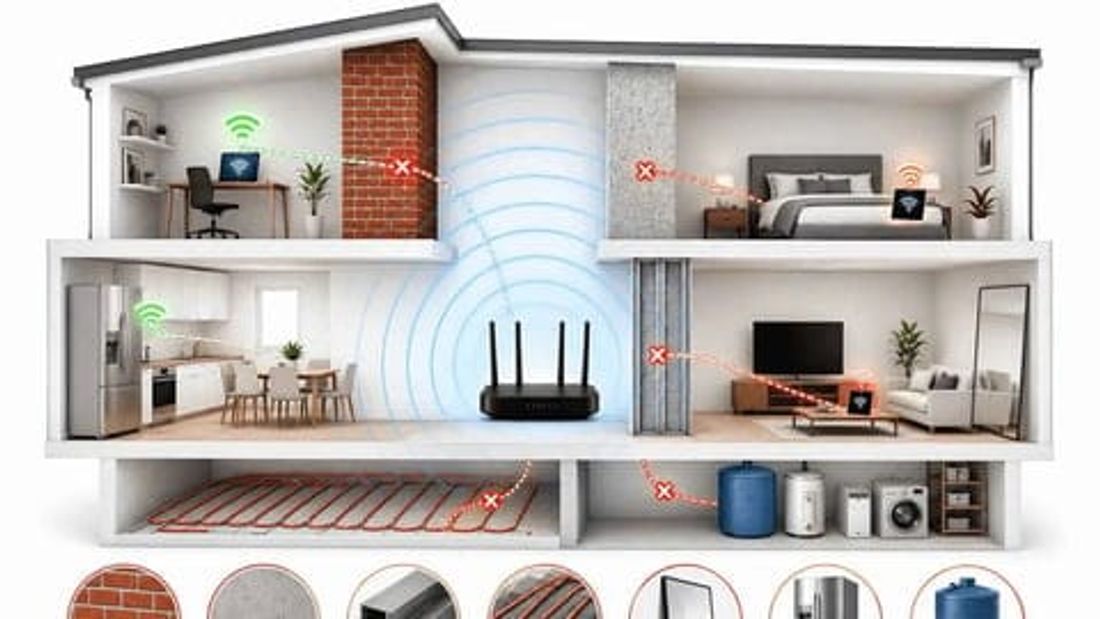
You may sit in the bedroom or home office and notice that your phone shows a strong Wi-Fi signal, yet videos keep buffering and web pages take a long time to load, while the same devices work much faster in another room.
This contradiction does not necessarily mean there is a problem with your internet subscription speed. Instead, it may be related to how the signal travels through the home, the interference it encounters, or the router’s ability to handle connected devices.
𝗦𝗶𝗴𝗻𝗮𝗹 𝗦𝘁𝗿𝗲𝗻𝗴𝘁𝗵 𝗮𝗻𝗱 𝗦𝗽𝗲𝗲𝗱
Phones and computers usually display an indicator showing wireless connection strength, but it does not provide a complete picture of network quality.
A device may be close to the router and receive a strong signal while still experiencing wireless-channel congestion, packet loss, or high latency.
This problem is particularly common in buildings with a large number of nearby Wi-Fi networks. When surrounding networks use the same or overlapping wireless channels, the router may have to wait before transmitting data, resulting in noticeable slowdowns even when the signal indicator remains strong.
𝗪𝗮𝗹𝗹𝘀 𝗮𝗻𝗱 𝗙𝘂𝗿𝗻𝗶𝘁𝘂𝗿𝗲
Wi-Fi radio waves do not travel through every part of a home in the same way.
Reinforced concrete, thick walls, and metal doors can weaken the signal, while reflective surfaces and certain building materials can alter the path of the waves or affect how they propagate.
The result also varies depending on the router’s location and the network frequency. The 5 GHz band generally offers higher speeds under suitable conditions, but it is more affected by obstacles than the 2.4 GHz band, which can reach relatively longer distances, although it is more susceptible to congestion in some environments.
As a result, a room that is geographically closer to the router may have a poorer connection than a more distant room if the signal has to pass through thicker walls or different obstacles.
𝗗𝗲𝘃𝗶𝗰𝗲 𝗖𝗼𝗻𝗴𝗲𝘀𝘁𝗶𝗼𝗻
Interference does not come only from neighboring Wi-Fi networks. Certain nearby electronic devices and wireless connections can also affect network performance, particularly on the 2.4 GHz band.
Having a large number of connected devices, such as smart TVs, security cameras, speakers, and smartphones, can also put additional pressure on the network if they are transmitting data at the same time.
That does not mean every connected device consumes a large amount of internet bandwidth, as the impact depends on how each device is used.
Streaming several high-definition videos or transferring large files can consume a significant portion of available bandwidth, while small home sensors may use very little data.
𝗧𝗵𝗲 𝗥𝗲𝗮𝗹 𝗖𝗮𝘂𝘀𝗲 𝗼𝗳 𝘁𝗵𝗲 𝗦𝗹𝗼𝘄𝗱𝗼𝘄𝗻
Instead of immediately buying a new device or changing your internet subscription, you can start with a simple test. Measure the connection speed in the room where the problem occurs, then repeat the test near the router, using the same device and stopping large downloads whenever possible.
If the speed is good near the router but drops significantly in the other room, the problem may be related to coverage or interference.
If the speed is low in both locations, however, the cause may lie with the connection provided by the internet service provider, the router itself, or congestion on the home network.
It is also useful to test the connection on both the 2.4 GHz and 5 GHz bands, update the router’s firmware, and place the router in a high, open location away from enclosed corners.
If the problem persists in a particular room, a mesh Wi-Fi system or an additional access point connected via Ethernet cable may help, provided it is placed in a suitable location.
𝗖𝗵𝗮𝗻𝗴𝗶𝗻𝗴 𝗡𝗲𝘁𝘄𝗼𝗿𝗸 𝗘𝗾𝘂𝗶𝗽𝗺𝗲𝗻𝘁
Adding a Wi-Fi signal extender is not necessarily the best solution in every situation.
If the device is simply rebroadcasting an already weak connection, it may expand coverage without providing a sufficient improvement in speed.
In homes with thick walls or large areas, a mesh Wi-Fi system or a wired access point may provide more stable performance.
Ultimately, the number of signal bars alone is not enough to assess the quality of a home network. Actual performance is affected by connection quality, interference, congestion, and the location of devices.
For this reason, identifying where the problem occurs through testing is the most important step before spending money on solutions that may not address the real cause.
𝗦𝗼𝘂𝗿𝗰𝗲: 𝗘𝗿𝗲𝗺 𝗡𝗲𝘄𝘀